
JP Real Estate1.0 - App Store
You'll be able to see results in few seconds.
Publisher Description
Hi, I am Jess Phua, a real estate agent in Singapore, who constantly strive to improve and add value in our client servicing, aspiring to achieve the highest standards of moral conduct in all our business dealings and tremendous focus on customer satisfaction to provide the - Service You Trust.
As a real estate agent, I strive to tend to your investment and property requirements. I hope to be able to assist you with the pertinent information to allow you to make an informed decision, be it looking to expand your investment or looking to settle in your ideal home. I believe in commitment in providing dedicated servicing and client satisfaction from the point of contact to the closure of the deal, every moment is treated with utmost attention.
I spare no effort to ensure complete peace of mind for my clients. I look forward to be able to provide my professional service to meet your real needs and for you to make the best real estate decision in your life.
Download this app to :
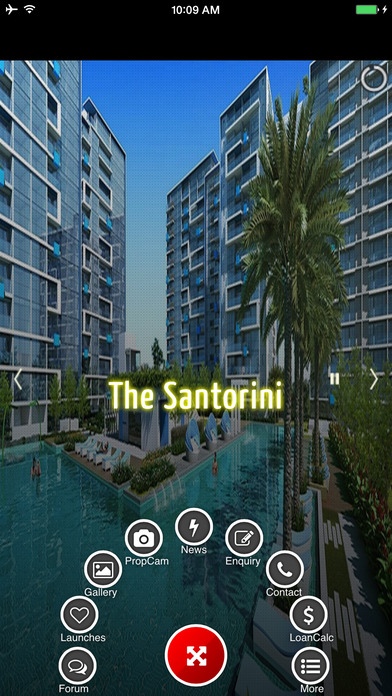
- Engage in property discussions in our Forum
- Be informed of the latest property Launches
- See property photos in Gallery
- Take a fun photo of your property and share with friends
- Keep up to date with the latest property News
- Do your Research on market trends
- Send Enquiry from your mobile phones
- Locate and Contact me using the GPS function
- Use Loan Calculator to find out mortgage loan installments
- View property Listings
- many More!
Requires iOS 5.0 or later. Compatible with iPhone, iPad, and iPod touch.
About JP Real Estate
The company that develops JP Real Estate is NetProfitQuest Pte Ltd. The latest version released by its developer is 1.0.
To install JP Real Estate on your iOS device, just click the green Continue To App button above to start the installation process. The app is listed on our website since 2015-01-15 and was downloaded 0 times. We have already checked if the download link is safe, however for your own protection we recommend that you scan the downloaded app with your antivirus. Your antivirus may detect the JP Real Estate as malware if the download link is broken.
How to install JP Real Estate on your iOS device:
- Click on the Continue To App button on our website. This will redirect you to the App Store.
- Once the JP Real Estate is shown in the iTunes listing of your iOS device, you can start its download and installation. Tap on the GET button to the right of the app to start downloading it.
- If you are not logged-in the iOS appstore app, you'll be prompted for your your Apple ID and/or password.
- After JP Real Estate is downloaded, you'll see an INSTALL button to the right. Tap on it to start the actual installation of the iOS app.
- Once installation is finished you can tap on the OPEN button to start it. Its icon will also be added to your device home screen.
Program Details
System requirements
Download information
Pricing
Version History
version 1.0
posted on 2015-01-15
Disclaimer
Official App Store Link
We do not host JP Real Estate on our servers. We did not scan it for viruses, adware, spyware or other type of malware. This app is hosted by Apple and passed their terms and conditions to be listed there. We recommend caution when installing it.
The App Store link for JP Real Estate is provided to you by apps112.com without any warranties, representations or guarantees of any kind, so access it at your own risk.
If you have questions regarding this particular app contact the publisher directly. For questions about the functionalities of apps112.com contact us.
